


We built the site to open quickly in a mobile browser and to feel like a dedicated app when launched from the home screen. Instead of installing a separate Rainbet official app, users can add the Rainbet icon in just a few taps, without a separate download. The game catalogue, account balance and settings remain synchronised with the desktop version.
Alternative Casino Apps in the UK
British players can choose between native casino applications and browser-based mobile platforms. For those searching for Rainbet app UK, the browser option provides direct access from the phone without taking up space with a large installation file. The layout automatically adjusts to the screen size and keeps the main account functions in one place.














Does Rainbet Have a Mobile App
Rainbet works like a mobile application when the website is added to the phone’s home screen. It is not a separate program, but the same mobile-optimised site opened through a dedicated shortcut. The main difference is convenience, as the platform launches directly without requiring users to type the web address.
| Feature | Home screen shortcut |
| Launch | Opens directly without entering the web address |
| Storage | Requires almost no space on the device |
| Push notifications | In stock when supported by the browser and permitted by the user |
| Login | The browser can save the account credentials |
| Internet connection | Always required, as there is no offline mode |
The main benefit is faster everyday access rather than exclusive mobile features. By opening the Rainbet app from the home screen, users save several seconds on each visit and reach their account without navigating through the browser first. Login details can be recorded in the same way whether the platform is opened through the shortcut or the address bar.
Mobile Access on Android and iPhone
We use the same mobile setup on both operating systems, although the steps differ slightly between browsers. In practice, Rainbet app download means adding the website to the home screen through the browser rather than installing a separate file. Android users complete the process in Chrome, while iPhone users follow the equivalent option in Safari.
- Browser: Chrome opens the website directly, so a separate app store is not required.
- Menu: tap the three dots in the top-right corner to open the browser settings.
- Action: select “Add to Home screen” to save the shortcut directly to the phone.
- Storage: the shortcut uses almost no device memory because the content loads online.
- Notifications: Chrome may request permission to send push notifications during the first visit.
- Speed: the entire process normally takes less than 20 seconds.
On an iPhone, the process is completed through Safari because it supports home screen shortcuts directly. Users searching for Rainbet download ios do not need a separate installation file for their Apple device. Safari provides the same direct access through the Share button and the “Add to Home Screen” option.
- Browser: Safari provides reliable support for adding websites to the Home Screen on iOS devices.
- Button: tap the Share icon at the bottom of the screen, shown as a square with an upward-pointing arrow.
- Action: select “Add to Home Screen” to save the shortcut directly to the iPhone within seconds.
- Name: users can edit the shortcut name before saving it, while the website title appears by default.
- Notifications: iOS 16.4 and newer versions support push notifications from websites added to the Home Screen.
- Speed: the entire process normally takes less than 25 seconds with a stable internet connection.
Both methods provide the same result without additional installation files or unnecessary waiting. Anyone searching for Rainbet APK should note that the shortcut works like a standard app icon while loading its content securely through the browser. An active internet connection is required whenever the platform is opened.
Rainbet Mobile Access on iPhone
On an iPhone, the setup is completed through Safari rather than the App Store because no separate program is installed. For British users, Rainbet download involves opening the website directly through Safari and selecting Apple’s built-in sharing option. The shortcut can then be launched from the Home Screen with a single tap.
- Go to the main page.
Go to our casino main page using Safari and click the share button.
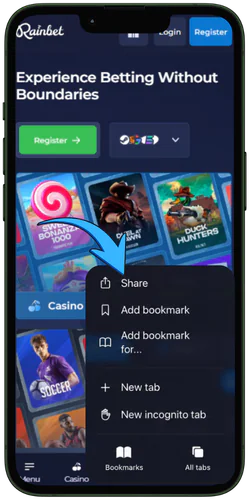
- Add to Home Screen.
In the window that opens, select “Add to Home Screen” from the list, as shown in the screenshot.
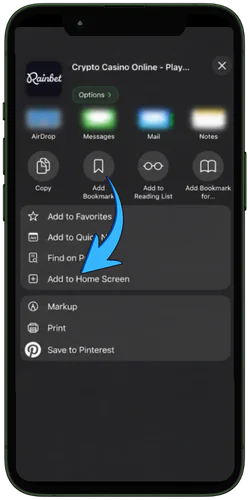
- Setting up a shortcut.
Here is the final shortcut setup. Check that the link is correct and select the name that appears on your smartphone screen.
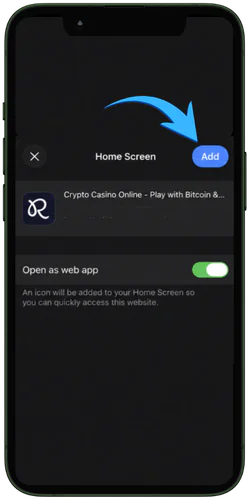
- Device on your desktop.
Now you are ready to use the application. One click on your desktop and you are in our application.
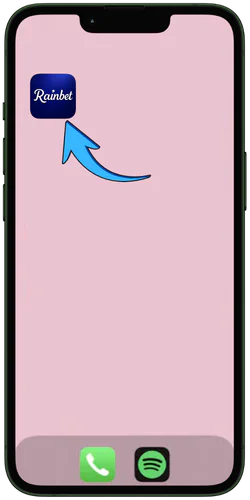
The entire setup normally takes less than 30 seconds with a stable internet connection. The browser recorded the selected settings after the first visit, allowing the shortcut to open directly next time. We recommend checking the device specifications before the first login.
System Requirements for iPhone Users in the UK
Older iPhone models can also run the mobile platform without noticeable problems. The requirements remain relatively low because we optimised the site for efficient performance and limited resource use. We tested stable operation on several older devices, and the specifications below should be checked before adding the shortcut to the Home Screen.
- Operating system: The mobile site performs best on iOS 15 or later, as older versions may not support all current security updates.
- Memory (RAM): The phone should have at least 2 GB of RAM so live games can load without noticeable interruptions.
- Browser: Safari is recommended when adding the website to the Home Screen on an iPhone.
- Device model: An iPhone 8 or newer model can process the graphics without lengthy delays.
- Display: The mobile version supports Retina displays from 4.7 inches, keeping text and game elements clear.
- Internet connection: A stable speed of at least 3 Mbps is recommended over Wi-Fi, 4G or 5G.
Loading may take slightly longer on older devices, particularly when several graphical elements are processed at once. Live casino games and video poker usually place the greatest demand on the device. The difference is most noticeable in titles with video streaming or detailed 3D effects, so the specifications should be checked before use.
Android Access Without a Separate APK File
Many users looking for Rainbet app for android expect to find a separate installation package, as some international casinos distribute APK files. We do not provide this type of file, so there is no need to allow installations from unknown sources. Instead, we have chosen a browser-based solution that opens through the official website and can be added directly to the home screen.
Go to our casino homepage using any browser on your smartphone.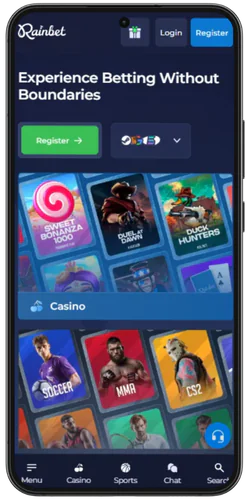
Click the three dots in the upper right corner to begin the installation.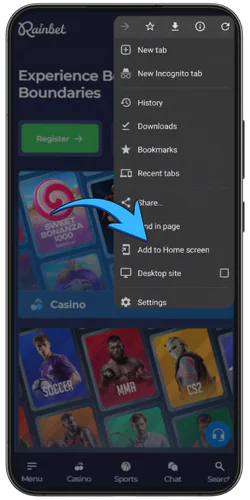
The window that appears will show the name of the desktop shortcut. You can rename it to make it easier to find, then click Next.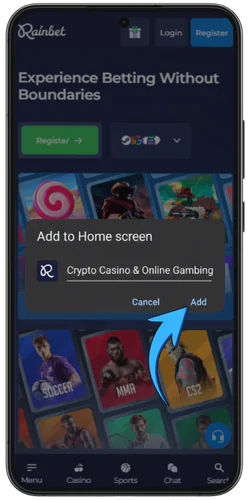
In this window you will see how the shortcut size, link and name will be displayed. If everything is correct, click “Add to desktop”.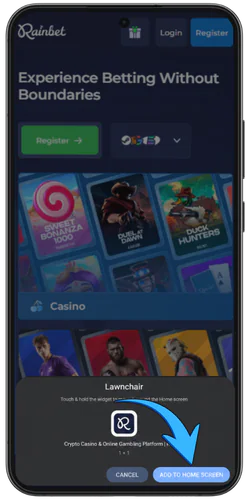
Now our casino is on your smartphone. Click on the shortcut icon and you will be immediately redirected to the main casino screen.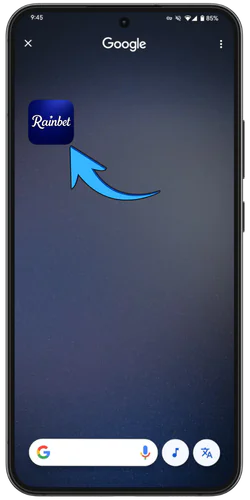
Files from third-party sources may contain malware or unauthorised copies of the platform. Anyone searching for the Rainbet official app should use the browser-based version, which updates automatically without a separate installation file. We recommend adding the website directly to the home screen through Chrome.
System Requirements for Android Users in the UK
The range of Android devices is considerably broader than the iOS selection, so performance requirements vary between manufacturers and models. We tested the mobile platform on dozens of different devices and browser versions. The minimum specifications below support stable operation and reduce the risk of slow loading or technical interruptions.
- Operating system: The website requires Android 8.0 or later, as older versions may not support all current security features, particularly during live casino streaming.
- Memory (RAM): The device should have at least 2 GB of RAM so live games and animations run smoothly, especially when several apps are open at the same time.
- Browser: Chrome is recommended because it offers reliable support for home screen shortcuts and push notifications on Android devices.
- Processor: A quad-chip processor running at 1.4 GHz or faster handles the graphics without lengthy delays, including in more demanding 3D slots.
- Display: An HD screen of at least 5 inches keeps game menus, controls and symbols clear on smaller Android phones.
- Internet connection: A stable speed of at least 3 Mbps over Wi-Fi, 4G or 5G is recommended to prevent interruptions during live streams.
The website can also run on older phones, although loading may take slightly longer. Live games and high-resolution slots usually place the greatest demand on the processor and memory. Checking the device specifications in advance helps reduce delays and technical interruptions during play.
Registration and Login on Mobile
We have kept registration short so British users can create an account directly from their phones. When accessing Rainbet app for android, the process requires a valid email address and a secure password, while confirmation normally takes only a few minutes. Once completed, the same account can be opened through the home screen shortcut or on a computer.
- Open the shortcut: tap the icon on the Home Screen to load the website directly and view the in stock games.
- Select Register: press the registration button in the top-right corner or the button in the centre of the homepage, as both open the same form.
- Complete the form: enter a valid email address and a password containing at least 8 characters, then check the details before submitting them.
- Accept the terms: confirm that you meet the age requirement and agree to the platform terms before activating the account.
- Log in: the browser may retain the active session or save the password when this function is enabled on the device.
Future logins follow the same straightforward process. Depending on the phone’s privacy settings, the browser can taken into account the account or keep the session active. A forgotten password can be reset in a few taps through the link on the login page without contacting customer support first.
Game Selection in the Mobile Version
The full game catalogue becomes in stock as soon as the shortcut has been added to the phone’s Home Screen. After completing the Rainbet app download process, British users can open slots, live dealer tables and sports betting from the same menu as in the desktop browser. A small number of demanding 3D titles may remain in stock on mobile because of technical limitations.

- Slots: 3,847 titles from different providers, including Pragmatic Play and Hacksaw Gaming.
- Live casino: 210 streamed tables covering blackjack, roulette and baccarat.
- Rainbet Originals: in-house titles such as Crash and Mines are optimised for smaller screens.
- Sports betting: football, ice hockey and basketball account for a large part of the in stock markets.
- Table games: video poker and baccarat open on mobile without a separate installation.
- Tournaments: weekly slot competitions are displayed directly on the mobile homepage.
The game catalogue is updated alongside the desktop version, so new titles become in stock without a manual installation. The most popular games are automatically placed near the top according to recent activity data. Search tools and filters organise the catalogue by category and work in the same way as they do on a larger screen.